Insert Media provides tools for embedding of video, audio, and image files from Kaltura in D2L.
Note:
This method is for embedding Kaltura Videos in Announcements, Discussions and anywhere else the HTML Editor is used. To connect a video quiz to a D2L gradebook, use the Existing Activities method.
-
Step 1
From within a D2L course, navigate to a section where the video is to be inserted. -
Step 2
From within the HTML Editor toolbar, select the Insert Stuff icon.Note:
The HTML Editor toolbar appears when creating a new file in Content, creating a new Announcement, starting a new thread in Discussions, for example.

-
Step 3
From the Insert Stuff options, select Insert Kaltura.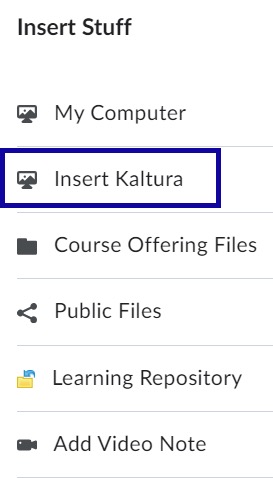
-
Step 4
Locate the video to embed and select Embed. -
Step 5
Select Insert.