Skip to main content
Search
Directory Filter
Contact Us
Home
D2L Course Design
Accessibility
Accessibility Overview
Accessibility Help Videos
Accessibility Trainings
External Accessibility Resources
LCC's Accessibility Guidelines
Design Resources
Design Resources Overview
Course Design Guidelines
Course Preparation Resources
Instructional Design Assistance
Master Courses
Go to D2L Course Design
D2L Help
Account Settings
Account Settings Overview
Access User Profile
Add Profile Information
Profile Image
Artificial Intelligence (AI)
Artificial Intelligence (AI) Overview
Lumi
Assessments
Assessments Overview
Assignments
Learning Outcomes
Quizzes
Rubrics
Self Assessments
Surveys
Communication
Communication Overview
Announcements
Discussions
Email Classlist
FAQ
Groups
Content Management
Content Management Overview
Authoring Tools
Content
Copy, Export, and Import
Learning Object Repository (LOR)
Manage Dates
Navigation
Course Tools
Course Tools Overview
Attendance
Calendar
Checklists
Equation Editor
Intelligent Agents
My Home and Course Homepage
Data and Reporting
Data and Reporting Overview
Analytics Builder Dashboards
System Dashboards
Reporting
Feedback and Grades
Feedback and Grades Overview
Awards
Class Progress
Grades
Quick Eval
Go to D2L Help
D2L Integrations
Ally
Ally Overview
Accessibility Report
Accessibility Score Indicators
Alternative Formats
View and Correct Accessibility Issues
H5P Interactives
H5P Interactives Overview
Add Interactives to Course
Clone Interactives
Connect to Gradebook
Create Interactives
Edit Interactives
Reporting and Analytics
Smart Import
Kaltura
Kaltura Overview
Add Media
Create Media
Edit Media
Video Quizzes
LockDown Browser
LockDown Browser Overview
Fix Permissions
Quiz Configuration
Special Access
ReadSpeaker
ReadSpeaker Overview
Download MP3
Listen to D2L Webpages
Listen to Documents
Respondus 4.0
Respondus 4.0 Overview
Format Import Files
Import Exams
Install Respondus 4.0
Print Quizzes
Retrieve Quizzes
Server Profile Configuration
TextAid
TextAid Overview
Library
New Text
Web Reader
Webex
Webex Overview
Classroom Collaboration
Meetings
Office Hours
Setup
Go to D2L Integrations
D2L Service Requests
D2L Procedures
D2L Procedures Overview
Access
Accessibility
Course Size Limit
Gradebook
Integrations
Kaltura Storage Management
System-Wide Announcements
System-Wide Groups
5Star Service Request Forms
5Star Service Request Forms Overview
Add User to Course
Common Assessment Site
Course Accessibility Review
Course Copy
Course Deletion
Crosslisting Courses
D2L Assistance
D2L Faculty Feedback
Group Creation
Guest User Access
Incomplete
Instructional Design Assistance
Master Course
New Publisher Integration
Remove User From a Course
Go to D2L Service Requests
D2L Support
D2L Support
D2L Support Overview
eLearning Live! Sessions
Self-Paced Trainings
Go to D2L Support
Search LCC
Directory Filter
Contact Us
Home
D2L Integrations
ReadSpeaker
Listen to D2L Webpages
ReadSpeaker
Listen to D2L Webpages
D2L Integrations Overview
ReadSpeaker Overview
Download MP3
Listen to D2L Webpages
Listen to Documents
Listen to D2L Webpages
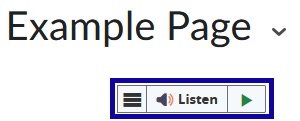
From within
D2L
, locate and select
Listen
.
After selecting
Listen,
the D2L webpage will read aloud.
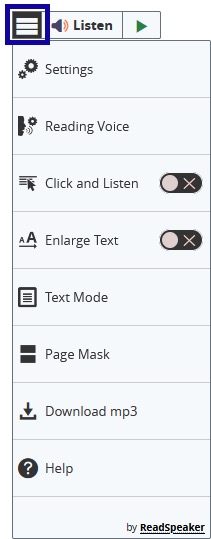
Additional controls and tools are available by selecting the
webReader
menu.
©