Add Interactives to Course provide two methods for adding previously created H5P Interactives to a course in D2L.
Create a File
Create a File provides the ability to incorporate interactives within lectures or when multiple interactives will be used in a single content item.
-
Step 1
From within a D2L course, select Content. -
Step 2
From the Table of Contents, select a Content module. -
Step 3
From the Upload/Create dropdown menu, select Create a File. -
Step 4
Within the HTML Editor toolbar, select Authoring Tools, and select Interactives from the dropdown menu.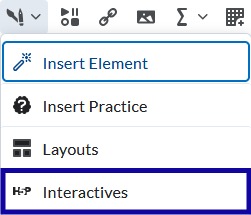
-
Step 5
Select Import Existing Interactive.
-
Step 6
Locate the interactive to be added. -
Step 7
Select Insert.
Existing Activities
Existing Activities provides the ability to add a single interactive within a content module. If set to be graded, this option will immediately create a grade item in the gradebook.
-
Step 1
From within a D2L course, select Content. -
Step 2
From the Table of Contents, select a Content module. -
Step 3
From the Existing Activities dropdown menu, select H5P.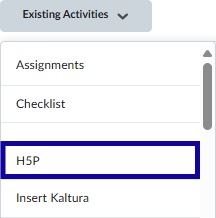
-
Step 4
Locate the interactive to be added. -
Step 5
Select Insert.