Share Meeting
Webex Site
- Navigate to https://lccedu.webex.com .
- Log in with the LCC email and password.
Note:
You must login with @star.lcc.edu email address.
- From within Webex:
- Select the Meetings tab.
- Optional: Adjust the calendar date range, if needed.
- Select the title of the meeting.
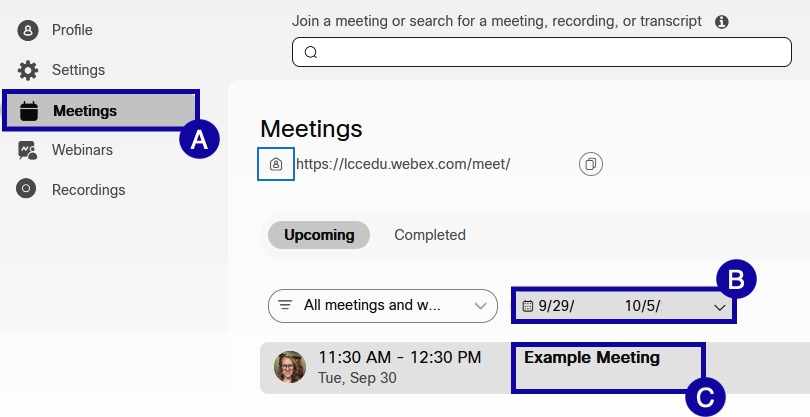
- From the Join information section, copy the meeting link by selecting the copy icon.

- Paste the link to share the meeting.
Outlook Web
- Navigate to https://my.lcc.edu .
- Log in with the LCC email and password.
- Select Outlook Web.

- To access LCC Outlook Calendar:
- Select the App Launcher.
- Select Calendar.

- Navigate to the date of the meeting.
- Open the calendar invite for the meeting.
- Copy the meeting link.
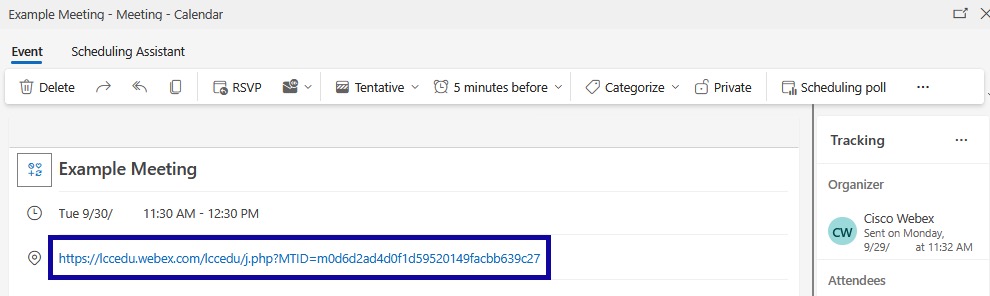
- Paste the link to share the meeting.