Skip to main content
Search
Directory Filter
Contact Us
Home
Accessibility
Accessibility Tools
Alternative Formats
Kaltura Download Transcript
ReadSpeaker
TextAid
Accessibility Resources
Center for Student Access
Student Accessibility Assistance
Go to Accessibility
D2L Help
Account Settings
Account Settings Overview
Notifications
Profile
Assessments
Assessments Overview
Assignments
Quizzes
Surveys
Communication
Communication Overview
Discussions
Email Classlist
Course Tools
Course Tools Overview
Checklists
Equation Editor
My Home and Course Homepage
Feedback and Grades
Feedback and Grades Overview
Awards
Class Progress
Feedback
Grades
Navigation
Navigation Overview
Access D2L
Access D2L Courses
Navigation
Go to D2L Help
D2L Integrations
Alternative Formats
Alternative Formats
Google Workspace
Google Workspace Overview
Link Google Workspace
Submit from Google Drive
Kaltura
Kaltura Overview
Create Media
Edit Media
Insert Media
ReadSpeaker
ReadSpeaker Overview
Download MP3
Listen to D2L Webpages
Listen to Documents
TextAid
TextAid Overview
Library
New Text
Web Reader
Webex
Webex Overview
Classroom Collaboration
Meetings
Office Hours
Go to D2L Integrations
D2L Service Requests
5Star Service Request Forms
5Star Service Request Forms Overview
D2L Assistance
D2L Student Feedback
Student Accessibility Assistance
Go to D2L Service Requests
D2L Support
D2L Support
D2L Support Overview
eLearning Live! Sessions
Self-Paced Trainings
Go to D2L Support
Search LCC
Directory Filter
Contact Us
Home
D2L Integrations
Webex
Meetings
View Recordings
Meetings
View Recordings
D2L Integrations Overview
Webex Overview
Classroom Collaboration
Meetings
Meetings Overview
Join Meetings
View Recordings
Office Hours
Office Hours Overview
Join Office Hours
Reserve Office Hours
View Recordings
From the
Communications
menu within a
D2L course
, select
Webex
.
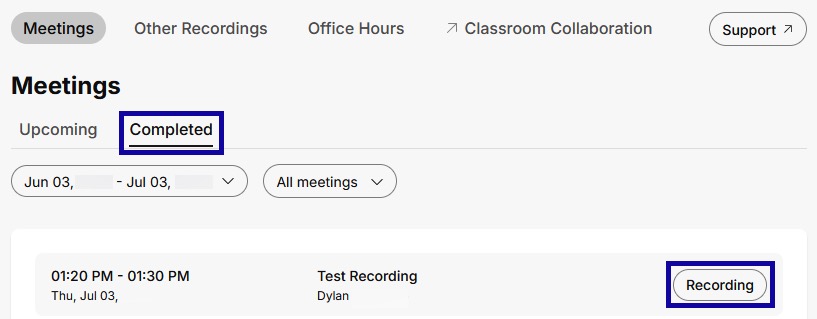
Select the
Completed
tab.
Select
Recording
for the desired meeting.
©